Viktor, Please also read the above message and this one.
cc: @mark-piller
I checked the logic for all of the pages and was able to confirm that you modified the logic without my consent. At no point should any of the logic within my pages be changed without first talking to me to understand what else you may be impacting. As a result of your unauthorized changes, data is broken and I’m not sure [right now] how to get it back.
The original issue didn’t require any modifications to logic on the UI. It requires an assessment of the data mapping on the Backendless side. If you need to check something, the requirement is to make a copy of the intended page and work only on that copy.
Hello @TL_Robinson
I haven’t made any changes to the logic of your application — I didn’t even open the UI or access any of the pages.
All I did was manually add a new user to the Users table, setting specific values for the objectId and ownerId fields so that the user could be easily identified later.
Then I sent you a message here suggesting you test your logic using that user, hoping it would finally help demonstrate that there is no bug — as has already been explained multiple times in this thread.
No other actions were taken on my part.
Viktor
@mark-piller
Viktor - I checked the logic have confirmed that you did make changes. Specifically, you changed the logic to hard push the credentials into the user table. That unauthorized change negatively impacted the app and prevented data from any other new test accounts from flowing through the expected journey. It took me 4 hours to root cause, trace all impacted pages and fix it.
And, the defect still persisits. The logic calls for the objectId, yet the ownerId populates. I’m sure why you don’t consider this a defect. And, if it’s not going to be changed, what is the objectId called in the backend so I know what to input into the logic to retrieve it?
Also, as this will impact the functionality of the app and data flow, do I have a commitment on the Backendless side that the mapping for the metrics and attributes won’t change in the future? If they do, the integrity and legal compliance requirements will fail.
Hi @TL_Robinson
As far I know no body from our team has changed your logic, moreover it’s out of support policy to debug customer’s code/logic and make any changes, only in a specific cases we can go into an app to understand/help with an issue more faster.
According to you problem, I have read the entire topic and still do not understand what the issue is.
To reduce the ton of lines in the thread, I propose to operate with simple actions and results:
From you:
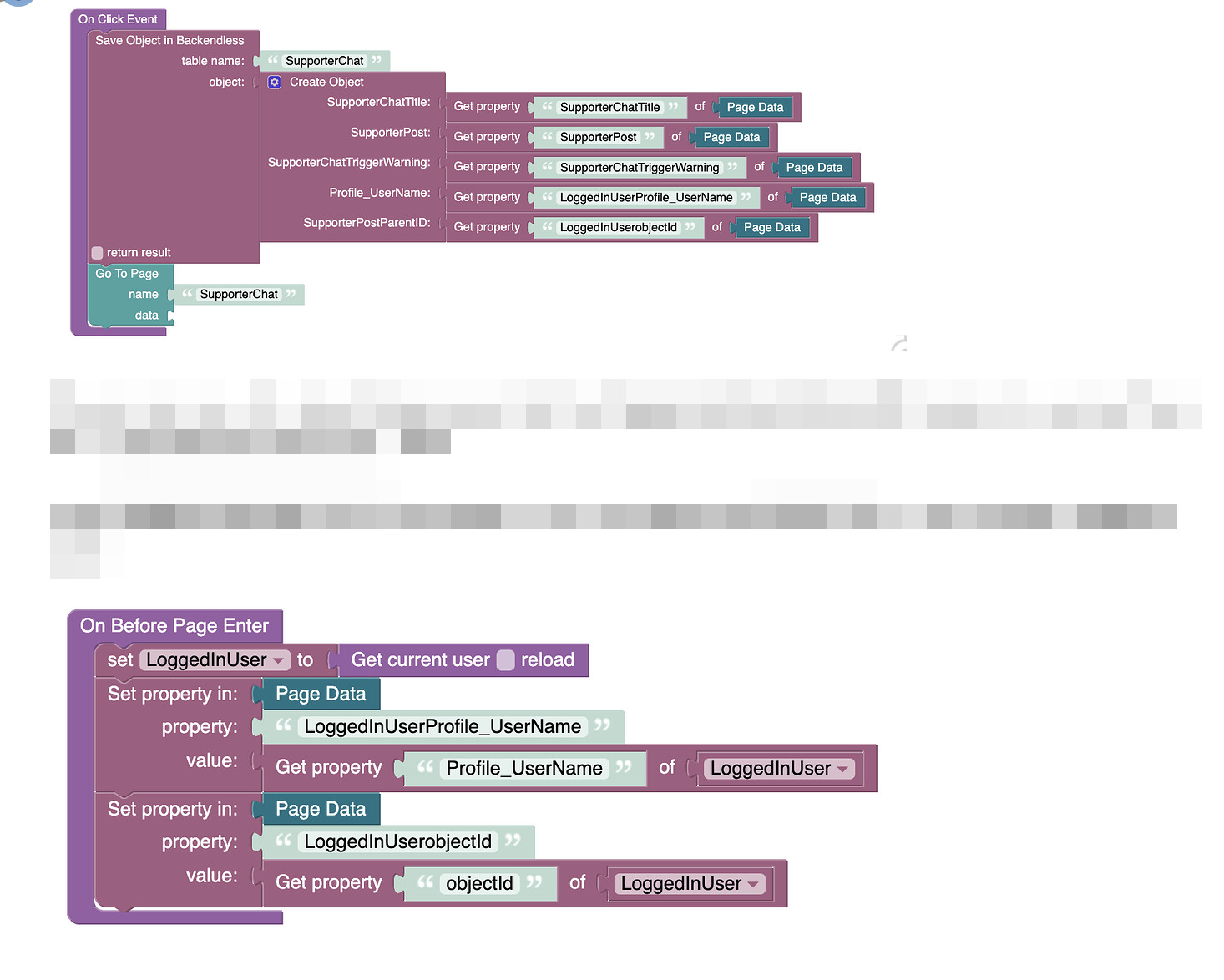
you can not understand why the column SupporterPostParentID contains value X (object id of the loggedIn user who creates the record) it describes on the screenshots of your logic above
From our team:
we can not understand why you set the value X to the SupporterPostParentID column and expects different result
Also, you can abstract of objectId and ownerId columns, just imaging there are no such columns in the SupporterChat table, and focus on the SupporterPostParentID column.
These two questions are extremely important and without answers we can not move further:
- What value do you assign to the record before saving?
- And value do you expect to see in the DB?
Regards,
Vlad
Yes, the logic was changed. And, it was a debugging issue. My logic is correct. Also, two users added themselves as developers to my app without my consent. I have sense removed them.
Per your questions:
- I didn’t assign any values. Everything is auto-generated
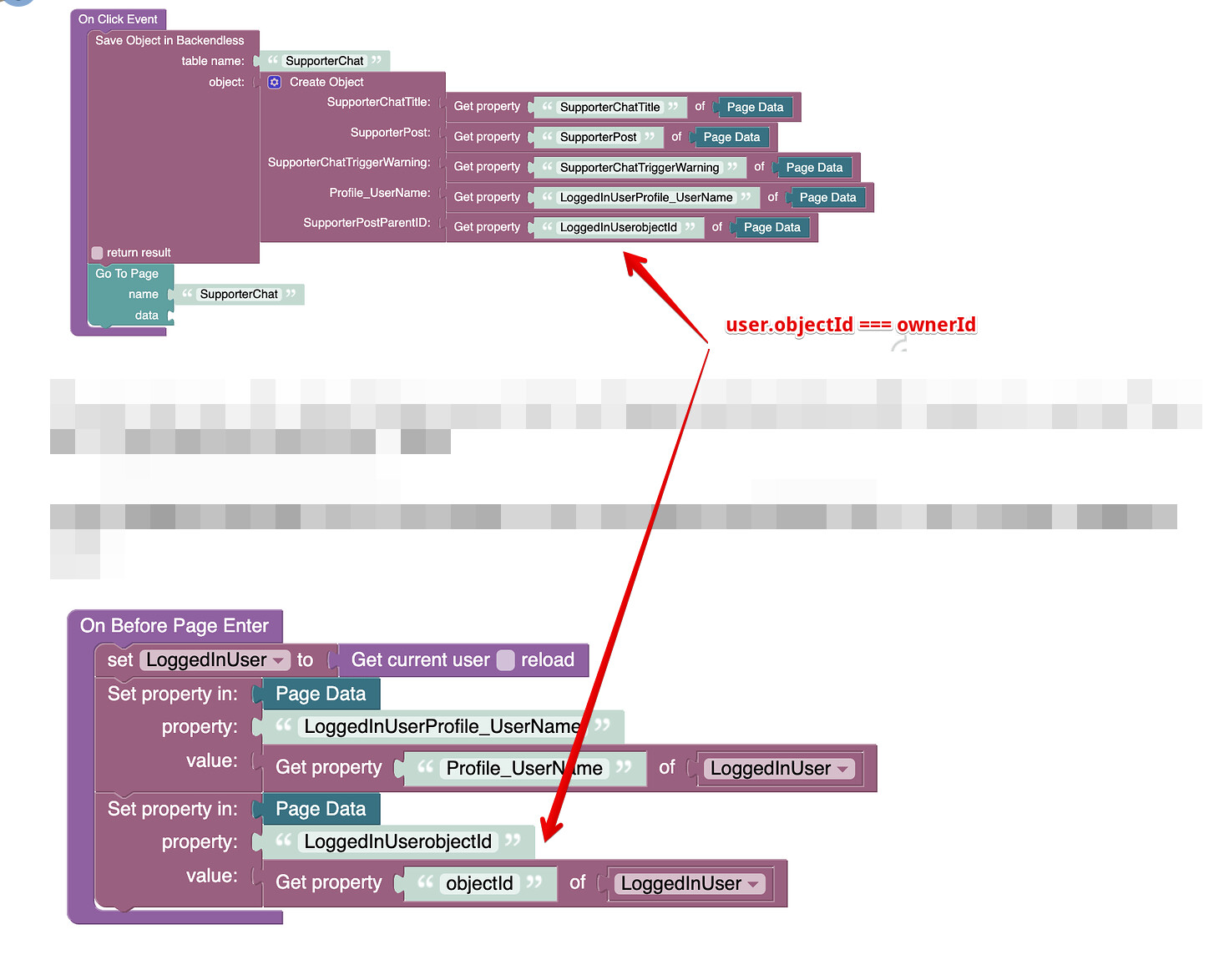
- I expect to see the objectId in teh SupporterPostParentID column, per the logic. The logic calls the objectid, but the ownerId appears.
The only users that could be added to your app are the members of our support team.
Also, the delete user fuctionality is also negatively impacted because the objectId isn’t retrieving the correct data when it is called. So, this error is impacting more than what I originally identified.
If the data mapping can’t be corrected, I just need the attribute name that will retrieve the objectId.
- I didn’t assign any values. Everything is auto-generated
Who has made/added this logic?
- I expect to see the objectId in the SupporterPostParentID column, per the logic. The logic calls the objectid, but the ownerId appears.
In that case, you need to fix your logic over here:
That logic still doesn’t correct what I’ve identified. There is still an inconsistency. [NOTE: I previous resource went down this same path already.] And, the data in the tables appears different than in my last screen shot.
Since there isn’t knowledge to correct the defect. I’ll attempt another approach found in a video Mark recorded a while back. Hopefully, this will remedy this issue.