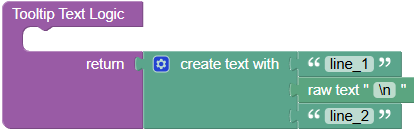
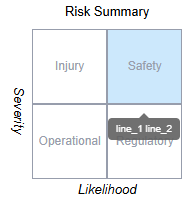
Is it possible to add a
linebreak, or a chr(13) or equivalent to tooltips so they display prettier within the Tooltip Text Logic block?
Like this:
Line_1
Line_2
Line_3
etc…
Is it possible to add a
linebreak, or a chr(13) or equivalent to tooltips so they display prettier within the Tooltip Text Logic block?
Like this:
Line_1
Line_2
Line_3
etc…
Hello @Michael_Kadron!
Unfortunately, no, but I have created an internal ticket BKNDLSS-29847 to create such a feature.
We will let you know as soon as it is ready.
Regards,
Alexander
Hello Austin Steil,
I have checked the status of the ticket, and it has been moved to the backlog due to the heavy workload of the team. We will discuss this and I believe we will raise its priority.
Regards,
Alexander
We are sorry we missed the topic without an update.
Since this case is quite rare and there is a workaround, we haven’t implemented any additional logic to handle the multiline tooltips.
Here is the workaround:
 items = items.map(item => {
    if (item === '\n') {
      return React.createElement('br')
    }

    return item
  })

  return React.createElement('span', {}, ...items)
make sure the “Return result” checkbox is disabled
attach to the block any text items you need, the \n item will be replaced with the React element for the line breaking.
you can move it to custom function to be able to reuse the code
Regards,
Vlad
Cool!
Thanks Vlad!
Mike
From “Vladimir Upirov via Backendless Support” <support-forum@backendlessmail.com>
To mike@hyperpixels.net
Date 2/20/2026 7:02:17 AM
Subject [Backendless Support] [UI Builder] Add
or chr(13) or linefeed to tooltips