I opened ‘On Page Enter’ logic to edit the codeless blocks I’d put in previously. All that was visible was this block:
It appears that the logic is still there but hidden and there is no clear way to reveal it. No options come up on mouse over, double clicking, or right clicking. How do I ‘untruncate’ the block so I can view and edit the logic?
App id: D3AEFCC3-94AD-4944-9AF0-C474EE2AD285
Hello,
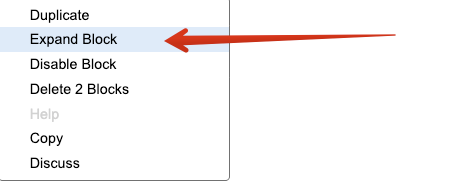
Try right-click and then select “Expand Block”:
Mark
Hi Mark.
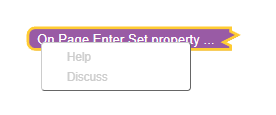
Unfortunately I’m not seeing those option. This is all that comes up when I right click:
I just checked on another object’s logic. The correct menu comes up when right clicking blocks inside the function (e.g ‘set variable to’, ‘if’, etc. ) but not the function (e.g.’ On Click Event’ or ‘On Page Enter’) itself.
Hello @Jessica_Maree_Kancharla
Unfortunately, I was unable to reproduce the issue in my application, but I did see the issue in your application. I will create a ticket for our specialist to help with a fix for your application.
Regards,
Inna
Thanks Inna. It wouldn’t take too long for me to redo the code but it would be best if the bug is identified and corrected so it doesn’t reoccur in future.
Hi @Jessica_Maree_Kancharla
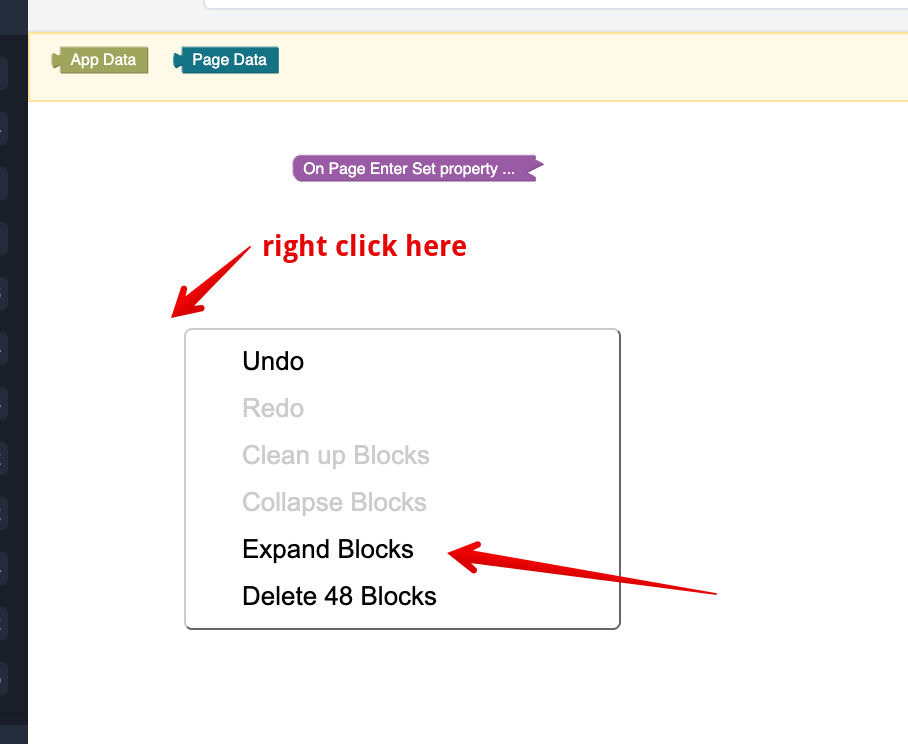
The logic was fixed, to expand the root block need to open the context menu over the workspace instead of the root block
Regards,
Vlad
1 Like
That worked. Thanks Vladimir 
1 Like