Application Id: D3AEFCC3-94AD-4944-9AF0-C474EE2AD285
I’m having difficulty getting the inbuilt backendless user password reset api to work. I get the following error when I run it:

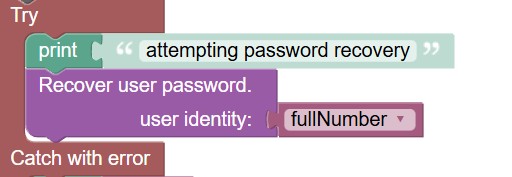
However the identity value is correct. I’ve set it up as shown below.
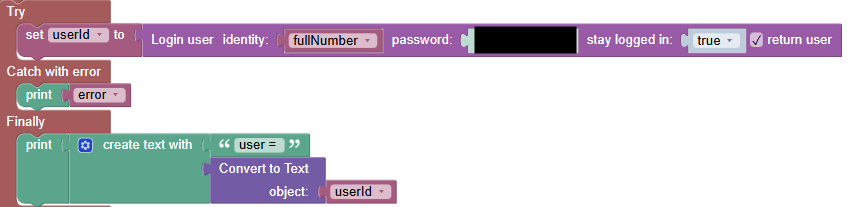
Just to confirm the input was correct, I’ve used the same value to successfully log in the user.
Also of note is the error is only reported in the server log, I don’t get an error message back to the client where the API is called.
Any insight to correct this is appreciated.
Hi @Jessica_Maree_Kancharla ,
As I can see from your app, currently identity for your users is email column. You can see it in “Data Service > Users table > Scheme > Table editor”. At the same time in your UI-Builder you use fullNumber variable which is probably holds value different from email.
I suggest you to try to use email for password recovery instead and see if you still have a problem.
Regards, Andriy
Hi Andriy. According to my ‘Users’ table, ‘mobileNumber’ is the identity value, which is what I want. It has the ‘?’ symbol on it that tells me so on mouse over and it is the value I use to successfully log in. Is there a setting elsewhere I need to change so the backendless password reset API recognises mobileNumber as the identity value as well? I will pass the email instead though, to see if that works. Debug messages have stopped showing in the real-time log so it is hard to troubleshoot presently.
@Jessica_Maree_Kancharla ,
Sorry about that — I was checking the wrong app. You are right: in your case, the user identity is the mobileNumber field.
I tried to reproduce the issue in my test app, but I wasn’t able to — password recovery worked even when using an identity other than email.
Would it be okay if I create a test user in your app and add a test API service to trigger password recovery so we can investigate this further?
Regards, Andriy
Yes, that’s okay with me. I appreciate the help.
@Jessica_Maree_Kancharla ,
I was able to reproduce the issue in both your application and mine.
The cause is the + symbol in the mobile phone number. I have created an internal ticket to fix this.
As a temporary workaround, if you need to keep the + symbol, you can create a separate identity column where it is removed. You can do this using a
generated column with the following expression:
SUBSTRING(mobileNumber, 2)
Sorry for the inconvenience.
Regards, Andriy
Thank you for figuring it out, Andriy. The ‘+’ symbol isn’t super necessary, I’ll remove it.