Custom Domain Not Found on Proxied Requests (Error 9070)

Hello,

I’m experiencing a persistent issue with my custom domain configuration and would appreciate any help.

My Setup:

  • Frontend: Flutter Web application
  • Hosting: Backendless Hosting (files deployed to /web)
  • DNS & Proxy: Cloudflare (proxy is enabled, “orange cloud”)
  • Custom Domain: acqadvantage.com
  • Backendless App ID: 0EB3F73D-1225-30F9-FFB8-CFD226E65F00

The Problem:
My Flutter application loads correctly when I navigate directly to https://acqadvantage.com.

However, when a user is redirected from an external site (like Stripe after a payment) to a URL with a query parameter (e.g., https://acqadvantage.com/?payment=success), the request fails. Instead of loading the app, the browser receives an HTTP 400 Bad Request with the following JSON error:

{
  "code": 9070,
  "message": "Application is not found by domain 'acqadvantage.com'.",
  "errorData": {}
}

Troubleshooting Steps Already Taken:

  1. I have confirmed my custom domain (acqadvantage.com and www.acqadvantage.com) is added to the “Custom Domains” section of my app settings.
  2. I have confirmed the Cloudflare SSL/TLS mode is set to “Full”.
  3. I have confirmed this is not a browser or application code issue. The error happens before our Flutter app can load.
  4. As a diagnostic test, when I temporarily disable the Cloudflare proxy (“DNS only” mode), the error changes to the expected SSL_ERROR_BAD_CERT_DOMAIN. This confirms my DNS records are pointing to the correct Backendless server. The 400 Bad Request / Error 9070 only occurs when the Cloudflare proxy is enabled.

My Question:
This seems to point to an issue with how the Backendless platform handles proxied requests from Cloudflare for my custom domain, specifically when the request originates from an external redirect. Could the Backendless team please check the server-side logs for my App ID to see why the domain lookup is failing in this specific scenario?

Thank you for your help.

Hello @Keith_Clift

Welcome to our community and thank you for trying out Backendless.

In your app:
Domain Control

www.acqadvantage.com
acqadvantage.com

Custom Domains

www.acqadvantage.com - for web folder

My test:
www.acqadvantage.com - OK
acqadvantage.com - redirect to www.acqadvantage.com - OK
www.acqadvantage.com/?payment=success - OK
acqadvantage.com/?payment=success - our database indicates that there is only the domain www.acqadvantage.com.
acqadvantage.com does not equal www.acqadvantage.com - that’s why you’re seeing the message:

Application is not found by domain 'acqadvantage.com`

Please try adding the domain acqadvantage.com in the Custom Domains section.

Regards,
Volodymyr

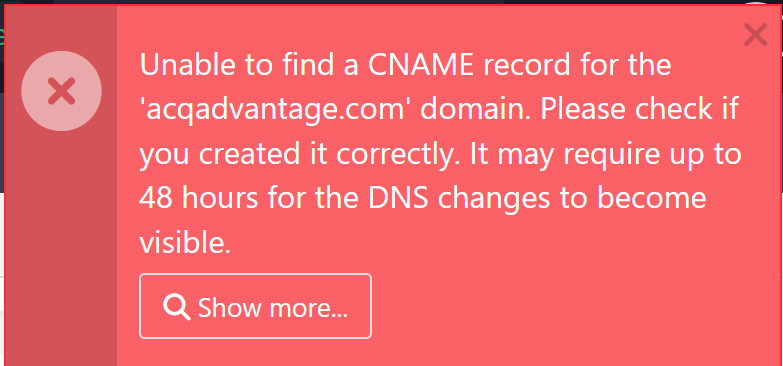
I tried to add before, and getting this error…


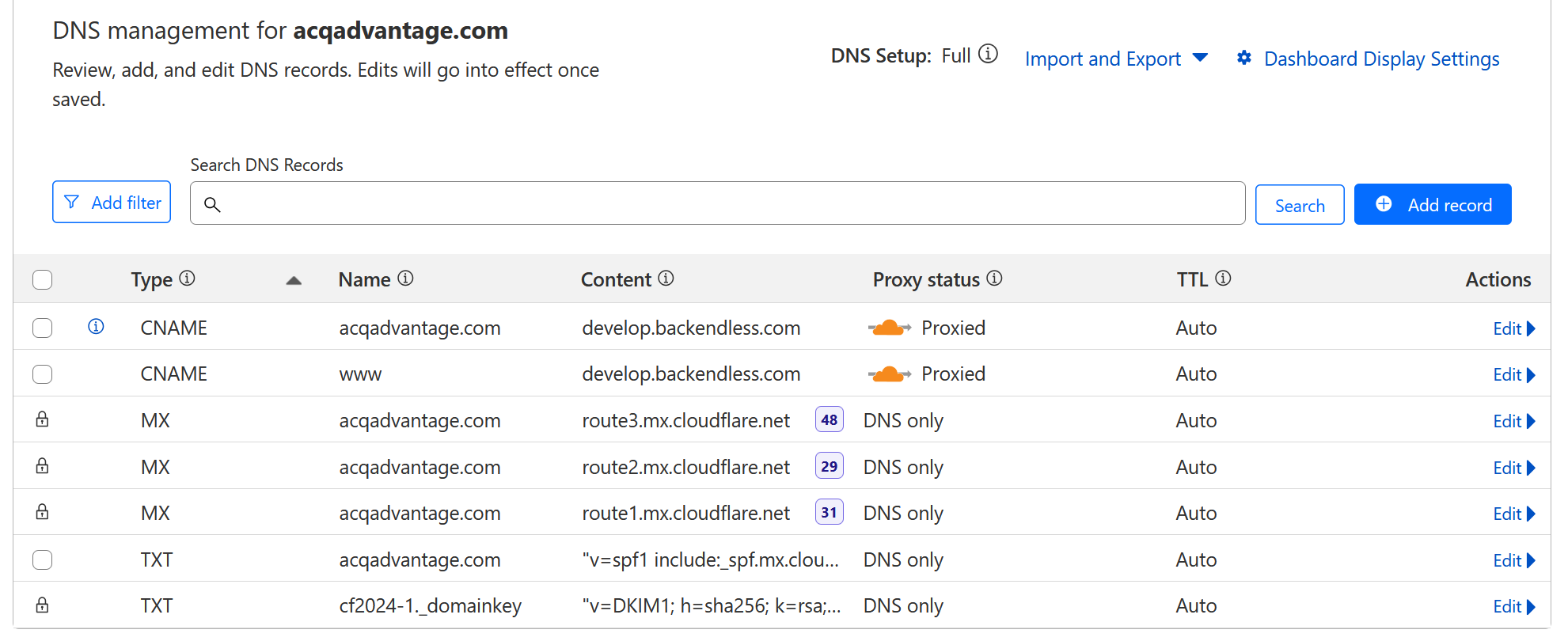
How I have it setup in cloudflare:

@Keith_Clift ,

How long ago did you create a CNAME entry for acqadvantage.com?

Regards, Andriy

Months if not a year ago.

Here is a detailed summary of all the steps I have taken so far to troubleshoot this issue.

  1. Initial Application & Server Code Fixes

I began by investigating potential bugs in my application code.

Python API Fix: I identified and fixed a bug in my Python API’s /create-checkout-session endpoint where it was returning the wrong JSON data (the Stripe session ID instead of the full checkout_url).

Flutter App Fix (Parsing): I fixed the corresponding bug in my Flutter AuthProvider, ensuring it correctly parsed the checkout_url from the API’s response.

Flutter App Fix (Redirect Handling): I identified that the Flutter app was missing logic to handle the user’s return from Stripe and implemented the logic to detect the ?payment=success URL parameter in HomeScreen to trigger a subscription status check.

  1. Full Refactoring to a Client-Side Flow

When the redirect continued to cause issues, I re-architected the entire payment flow to be more robust.

New Backend Endpoint: I created a new, secure /verify-payment-session endpoint in my Python API (app.py) to take a Stripe session_id from the Flutter app, verify it with Stripe’s servers, and then update the user’s subscription status in the Backendless database.

Backend Bug Fixes: I identified and fixed a critical bug in both the new /verify-payment-session endpoint and the original /stripe-webhook endpoint where the database query was using incorrect syntax for a relational column (ownerId instead of ownerId.objectId).

Frontend Refactoring: I modified the Flutter app to support this new flow by updating main.dart (for Stripe initialization), AuthProvider (with new redirect and verification methods), SubscriptionScreen (to call the new methods), and HomeScreen (to handle the return from Stripe with a session_id).

  1. Infrastructure & Server Configuration Debugging

When the error persisted, I moved to diagnosing the external server and service configurations.

Backendless Custom Domain: I confirmed the acqadvantage.com domain needed to be registered in the Backendless app settings. When I try to add acqadvantage.com it says that error about there not being a CNAME for acqadvantage.com, but there is one on Cloudflare, as mentioned above.

Cloudflare Proxy (“Grey Cloud” Test): To isolate the problem, I temporarily disabled the Cloudflare proxy. This changed the error to a predictable SSL_ERROR_BAD_CERT_DOMAIN, which proved that the DNS was pointing to the right server and that the Cloudflare proxy was a necessary component for providing the SSL certificate.

Cloudflare SSL/TLS Mode: I verified that the SSL/TLS mode was set to “Full”.

Browser Extensions: I ruled out browser extensions as the cause by testing in a clean browser profile.

Browsers: I tried different browsers and F12, Network, “Disable Cache”, and always do a hard refresh with CTRL + SHIFT + R.

Cloudflare Page Rules: I discovered and disabled a conflicting “Forwarding URL” Page Rule that was redirecting acqadvantage.com to www.acqadvantage.com. Still didn’t fix.

Cloudflare Bot Protection: Using Cloudflare’s “Trace” tool, I identified that “Super Bot Fight Mode” maybe incorrectly flagging requests from Stripe as malicious and blocking them. I disabled it. No change, same error.

I also tried removing any cloudflare features that might be causing it, noted a couple we’re enabled. I left “Browser Integrity Check” enabled, but as a targeted solution, I created a Configuration Rule to specifically disable the “Browser Integrity Check” for any requests coming from a stripe.com referrer.

Hi Keith,.

You can validate a DNS record using external tools such as mxtoolbox. I just checked AC advantage.com and the record couldn’t be found:

You might want to check with cloudflare to find out why the record is not being propagated.

As a point of reference, here’s what a valid cname registration should look like:

Regards,
Mark

Thanks will do, what was your example? You shared a duplicate link.

Sorry about that. Try looking up www.backendless.us