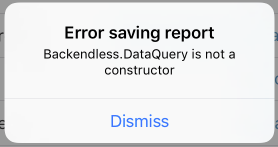
When I’m trying to save data into the database then I’m getting this error “Backendless.DataQuery is not a constructor”. Please have a look at the screenshot, I’m displaying the same error which I’m getting from the server.
Here is the full error:
Error: FAULT = ‘0’ [Backendless.DataQuery is not a constructor] <Backendless.DataQuery is not a constructor>
Here is the code:
NSString *fileName = [NSString stringWithFormat:@“reports/%@.pdf”, self.alert.caseNumber];
[backendless.file saveFile:fileName content:reportPDF overwriteIfExist:true response:^(BackendlessFile *file) {
 id<IDataStore> dataStore = [backendless.persistenceService of:[AccidentReport class]];
 self.report.reportPDFUrl = file.fileURL;
 self.report.mainDriverUser = self.alert.issuingUser;
 self.report.mainPIUser = self.alert.acceptedUser;
 [dataStore save:self.report response:^(id result) {
 [MBProgressHUD hideHUDForView:self.view animated:YES];

 UIAlertController *alert = [UIAlertController alertWithTitle:@"Success!" message:@"Your report has been uploaded to our system, and the appropriate parties have been notified."];
 [self presentViewController:alert animated:YES completion:^{
 [self markAlertAsCompleteAndExit];
 }];
 } error:^(Fault *fault) {
 NSLog(@"Error: %@", fault.description);
 [MBProgressHUD hideHUDForView:self.view animated:YES];
 UIAlertController *alert = [UIAlertController alertWithTitle:@"Error saving report" message:fault.message];
 [self presentViewController:alert animated:YES completion:nil];
 }];
 } error:^(Fault *fault) {
 NSLog(@"Error: %@", fault.description);
 [MBProgressHUD hideHUDForView:self.view animated:YES];
 UIAlertController *alert = [UIAlertController alertWithTitle:@"Error" message:fault.message];
 [self presentViewController:alert animated:YES completion:nil];
 }];
What version of the SDK do you use?
I’m using 4.0.
Here is the pod command.
pod ‘Backendless’, ‘~> 4.0’
Please run “pod update” from the root directory of the project. The latest version is 4.0.4
Here are the Application ids:
backendless 4.0.7: BCB96B8B-B9B0-DEE0-FFE3-CF21AC35B100
backendless 3.x: 11E027CC-8167-0540-FF9C-B7C4B60FC000
Could you please check if it have issues in backend or something?
Is the error with the 3.x app or 4.0?
Hi Amandeep,
We were able to reproduce the problem and are working on a resolution. We should have it fixed shortly.
Regards,
Mark
Hi Amandeep,
The problem is not in the iOS SDK, but in your business logic code. Specifically, in the following file:
/app/handlers/persistence/accidentreport/afterCreate.js
on lines 44 and 51 you have the following code:
var query = new Backendless.DataQuery();
That code is not valid - you cannot create an instance of that class in 4.0. For information on how to create a data query, please see the documentation at: https://backendless.com/docs/js/doc.html#data_search_and_query
Regards,
Mark
Hi Mark,
Thanks for your support but I’m still getting an error when I try to save data from mine application. This time its timeout error.
Error: FAULT = ‘0’ [Task execution is aborted due to timeout] <Task execution is aborted due to timeout>
Also If I save my business logic then it showing me a timeout error.
Is it possible if we can do skype call or something else so that I can show my code and resolve the problem?
Hi Amandeep,
The timeout error would occur when the business logic runs longer than allowed by the limit in the current billing plan.
Please check how long the execution takes and make sure it does not exceed the limit.
We do not provide support via skype, but I am sure, we’d be able to assist you through this forum.
Regards,
Mark
I agree that time out error could happen in current billing plan at client end but If I tap on “Save and Deploy all” button in backendless to upload code then also it showing me an error. Please check in attachments.

Thanks, we’re looking into it.
Regards,
Mark
To Backendless Support,
We are paying for Cloud 9 in version 3.0. In version 4.0 is shows we are on the Cloud 99 plan. Is this a bug or intended design?
We are no longer going to be using version 3.0. Can you move our credits to version 4.0 if it’s not a bug?
Thanks,
Marty
Marty,
Each application in Backendless has its own billing. We cannot transfer anything related to billing from one app to another.
The app in 4.0 shows Cloud 99 and it also shows that it is the free trial of the plan until the date shown in the Manage > Billing screen in Backendless Console.
Hope this helps.
Regards,
Mark
OK. It is so annoying that the plan is in free trial but every time Amandeep asks a question the first thing that is pointed to is the limits of the plan (free trial). If it’s a trial make it fully functional.
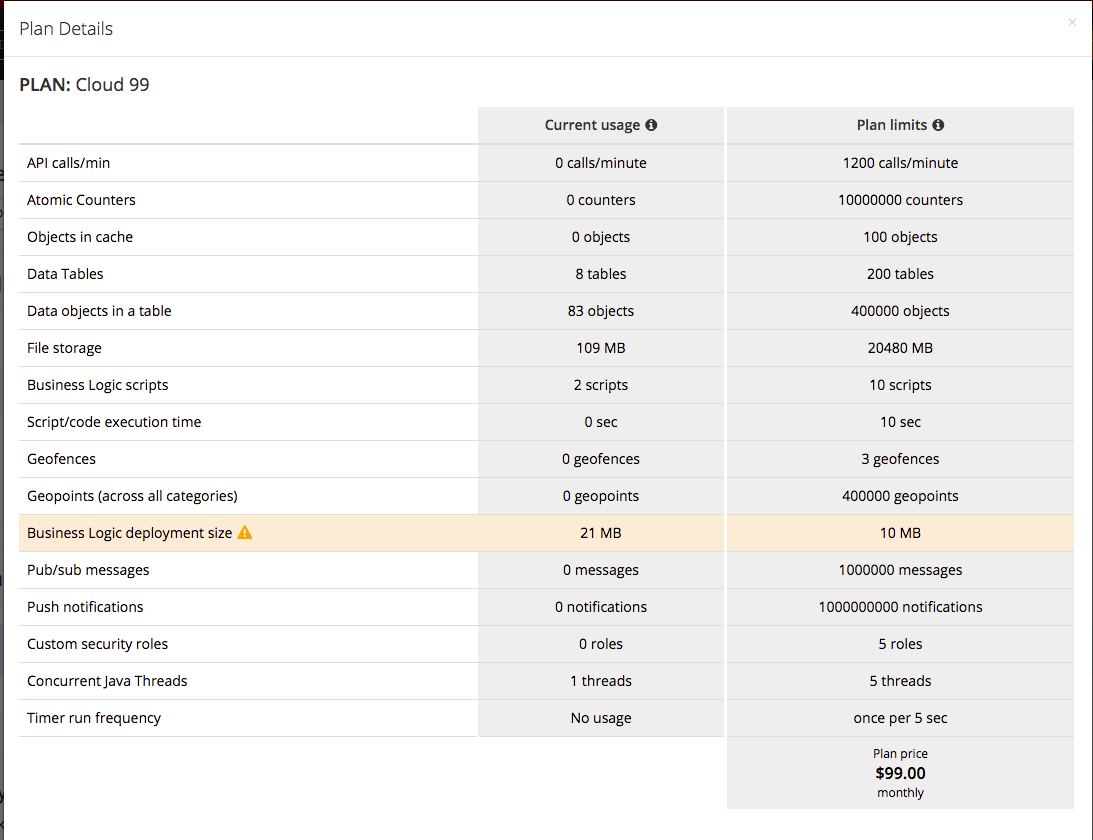
The problem is the app exceeds the limits of the current plan. This is what was said in every single communication. Your current plan is Cloud99 and the app exceeds its limits, which you can see by logging in to Backendless Console then navigating to Manage > Billing and clicking the “explain charges” link. The link will show the popup explaining what resources your app uses and where it exceeds the current plan limits.
OK. Thanks. We’re working on cleaning up the business logic coding.
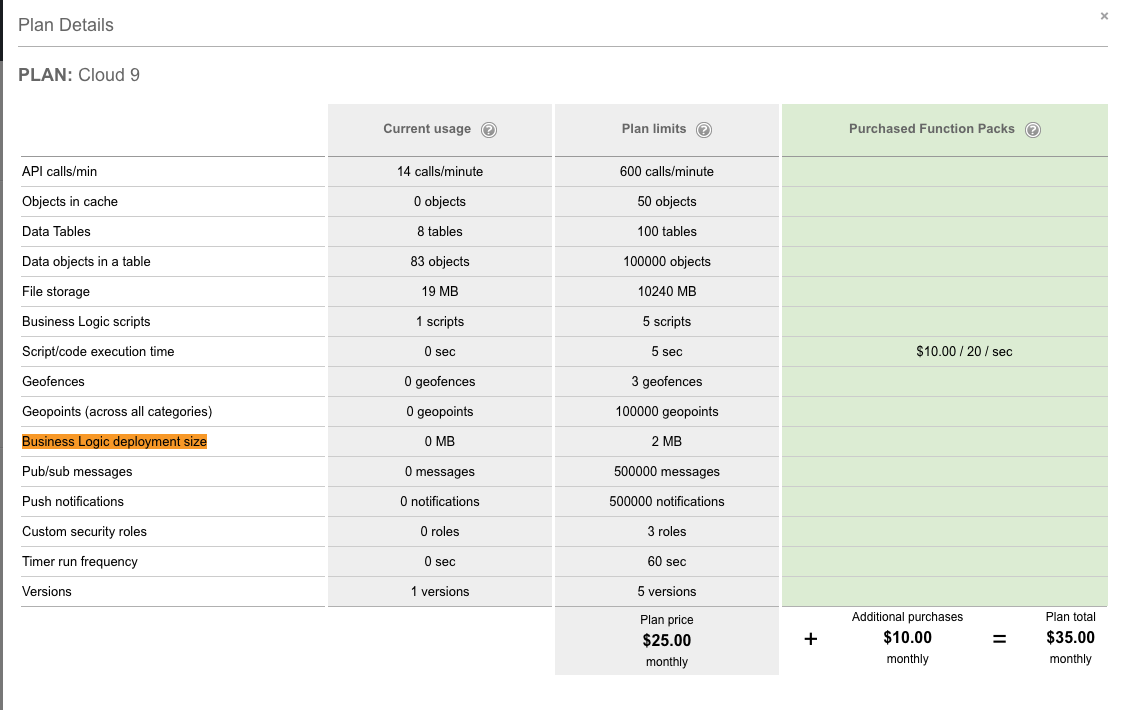
In the application 3.x business logic deployment size is 0 MB and in 4.0.7 it is 21MB(Check in attachments). I didn’t add any additional logic(folder or file). I just followed steps from backendless website to migrate data from 3.x to 4.0.7. Could you please review the business logic of 4.0.7. It has additional folders like node_modules, which are so heavy and increase business logic size.
About this I also asked a question yesterday and haven’t got any answer:
http://support.backendless.com/t/how-can-i-reduce-the-business-logic-deployment-size-to-less-than-20mb-in-backendless-4-0-7