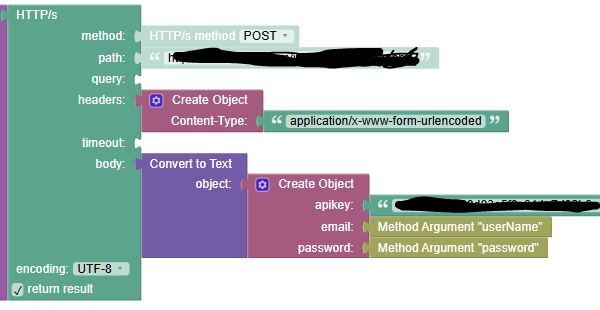
Hello I am trying to build HTTPS request in codeless. I managed to get pretty much everything but confused how to do the body. The format is x-www-form-encodedURL and you know how we can put key value pair in Post Man. How do I do the same in the body? I tried using converToText (object) block and added the values but it does not seem to work. any ideas
Hello, @Deress_Asghedom
The convertToText block didn’t work because it converts your data into JSON (like {"name":"John Doe"}), not into that key=value&key=value format, so the server doesn’t recognize it properly.
In Postman, when you add key-value pairs under x-www-form-urlencoded, it’s actually building a plain text string behind the scenes in this format:
name=John Doe&email=john@example.com
Unfortunately, in Codeless we don’t have a built-in URL params parser, but you can achieve the same result using a Text or concatenation block (create text with) to join your keys and values with = and &, then set that string as the request body.
Alternatively, if you’d rather not build the string manually every time, you can write a small custom JS function that converts your object into the correct urlencoded format automatically, and just call that function from your Codeless logic:
function objectToUrlEncoded(obj) {
  return Object.keys(obj)
    .map(key => encodeURIComponent(key) + '=' + encodeURIComponent(obj[key]))
    .join('&');
}
Please, give that a try and let me know how it goes.
Kind regards,
Karyna