Mission: DATA BINDING 101
Task: Add block component and bind styles logic
Please, describe your problem here.
Mission: DATA BINDING 101
Task: Add block component and bind styles logic
Please, describe your problem here.
Welcome to our community, and thank you for trying out Backendless!
Are you experiencing any issues with completing a mission?
Could you please share the steps you’re taking in detail? Additionally, we recommend carefully reviewing each step of the interactive instructions to ensure everything aligns perfectly.
I attempted to reproduce the issue with the “Mouse Out Event,” but everything seems to work as expected on my end.
Let me know if you need further assistance or additional clarification!
Regards,
Viktor
Hi Viktor
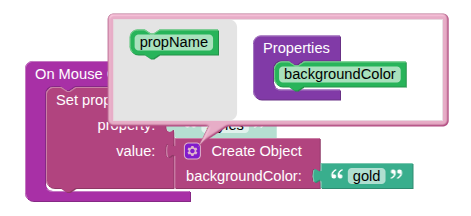
I have followed the steps as presented however after adding the “Create object” I then select the customise/settings icon to manually input “BackgroundColour”. Should I be changing the PropName in the same section too?
I then attach the text block to insert “Gold”. I follower the same process on the “On mouse out event” to insert “deepskyblue”
I have noticed that the tutorial seems to be a slighty different version to want I am using.
Yes, select “Create object”, click the gear icon, and enter “backgroundColor” (please pay attention to the casing — it must be exactly this, not BackgroundColour).
In the text block, enter “gold” (not “Gold”).
Make sure everything matches the instructions.
Then repeat the same process for the “On mouse out event”.
Regards,
Viktor
Resolved, Thank you!