So, I’m posting this here as the “discuss” finished in a dead-end in the UI-Builder. Here’s the same post with some small clarifications:
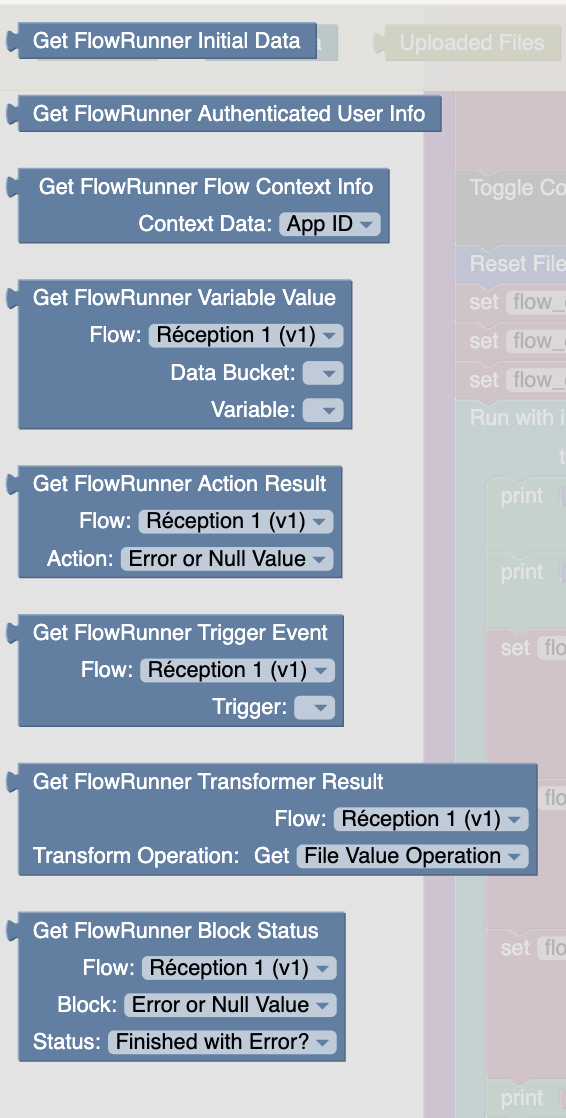
I would like to suggest the following feature for monitoring a flowrunner instance. In my case I am launching multiple instances of a FlowRunner flow in parallel and need to be able to monitor the result of each, however I think the current FlowRunner API is limited.
[Request]
If it would be possible to add the Execution ID as a parameter to, for example, “Get FlowRunner Block Status”, “Get FlowRunner Flow Context Info (Get Has Errors)”, and so on, I would be able to check each one of the initiated flows to see if they have completed, with error or success, and report this information to the user.
[Context]
It is currently really difficult to do basic logic like manipulating data objects directly in FlowRunner without using extensive AI credits. This stems from the fact that it’s difficult to manipulate objects in flow instance memory, for example accessing or setting nested properties. In theory I thought it should be possible but in practice had to resort to using AI to retrieve such properties, thus resorting to use AI credits to perform such nested property retrievals on in-memory objects.
As an alternative I considered setting up a Data Table for in-progress FlowRunner instances to reflect their current state and to read those from the UI Builder, but again I would prefer to lean on the proven UI Builder’s code logic instead of the FlowRunner which is still a bit difficult to use.
Hopefully this request can be considered. I provided extra feedback on FlowRunner to give a sense of my experience, hopefully that can help too. I will be happy to share more specific feedback if desired. Thank you very much to the Backendless team!
Thank you for your post. The support forum is indeed the better medium to discuss product related issues. Obviously, we’re interested in making the product as easy as possible to use. I would like for us to dig a little deeper to understand the complexities you ran into.
What would be super helpful is if you could describe the issues/difficulties you ran into in a two part format:
For every issue/difficulty describe:
(1) what you wanted to accomplish
(2) how you were solving it in FlowRunner/UI Builder
Please be as specific as possible. For example, when you say “manipulate objects”, elaborate what exactly you wanted to do, etc, etc.
Hi Mark, thanks for your response. I waited until I was developing on FlowRunner before responding, now I can detail some issues or missing features:
Missing Feature: Cannot get object relations using Data API. Neither object itself or even the ID of the relation item. I bypassed this using a View which already had the relation fields of interest built-in.
Missing Feature: The “Iterate List” has no return value handling. I can see three scenarios: it could have a single value (stop execution on return), multiple value (like “array.map()”) or no return value (continue on execution finish), like it is currently. I am obliged to do the following work-around to have a “map”-style return: Create Variable (empty “return values” list) → Run “Iterate List” on input list → execute transformation → Transform Data (add to list “return values”) → Return (null) → Use “return values” list.
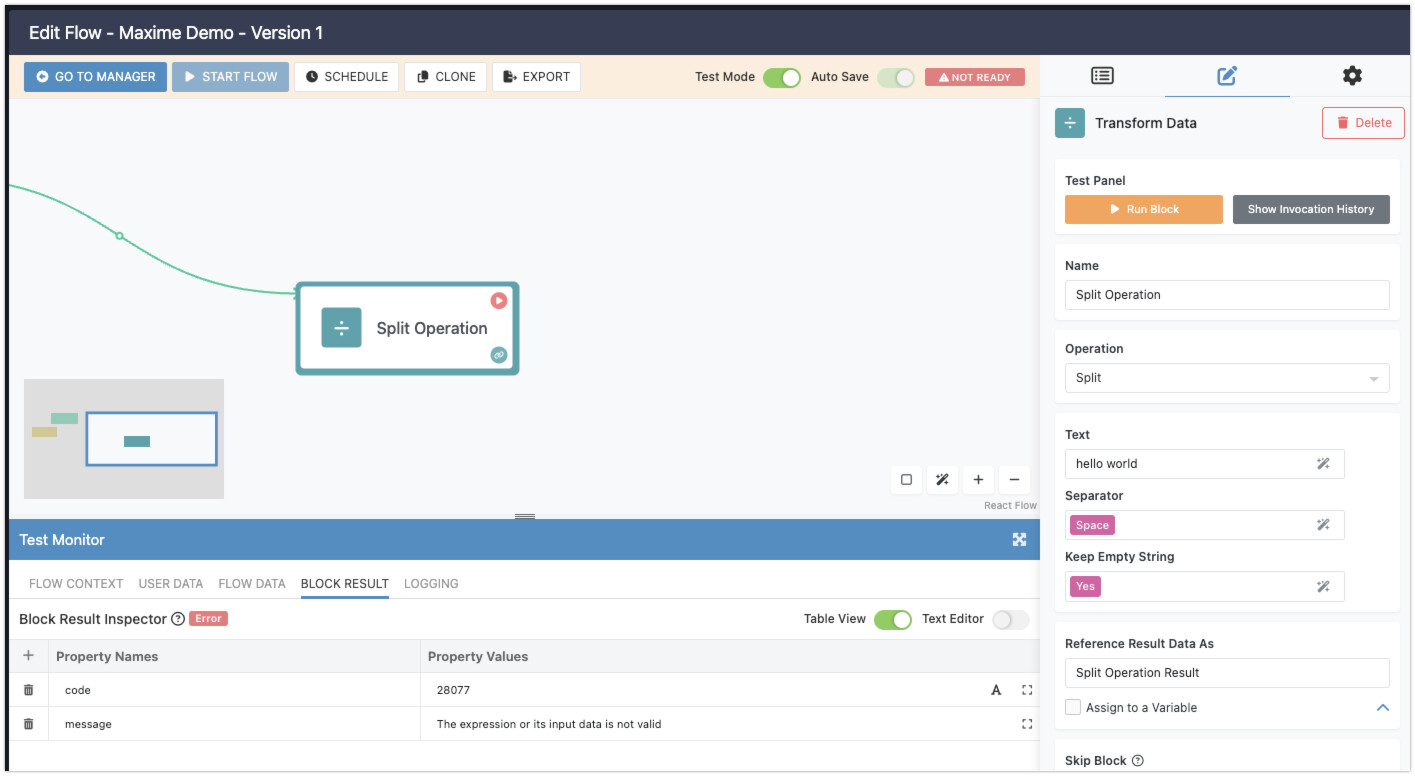
Potential Bug: “Keep Empty String” in Transform Data → Split operation: if you enter boolean value (Yes/No using visual editor) it breaks. You have to keep it empty or execution breaks.
Missing feature: There is no “Get object by ID” for Data Objects, instead one needs to use a where clause “Find Object” and specify the object-id.
Missing feature: When reviewing an instance execution in the UI, Expanded “iterate List” has no way to navigate different instance runs. This seems like a pretty big miss. I am forced to use logging instead.
Bug: Task after “Iterate List” was not executed even after “Iterate List” was executed. Maybe related is the fact that inside I had another “Iterate List”, which was passed an empty list as input, thus not executing. I have corrected this behavior by adding “Return value” with empty value in all “Iterate List” bodies.
Bug: Nested “Iterate List” is not executing at all despite being fed an input list. I have no work-around currently for this and would like to request support.
The original request, just to clarify, was to have a way to query specific FlowRunner instances’ results from UI Builder. I see there is no way to do this yet, I would like to request this feature, although I will be building a work-around by using Data Objects directly if required.
Thank you so much for putting this list together. It helps us tremendously in making the product better and seeing how it is used by customers.
I recorded a few videos to address some of the issued you pointed out. Please see below.
It is actually possible though local extensions. Here’s a video that explains why we did it that way and demonstrates how it can be done in FlowRunner:
You’re correct with the approaches you described, my comments are in the video below:
I was able to reproduce the problem. Did I do what you described?
This is in the same realm as the first issue. With the number of available APIs in the Backendless data service, the number of blocks can explode and subsequently increase the perceived complexity. Since it is quite easy to add custom extensions (i.e. APIs), it should solve the problem
You’re absolutely correct, analytics has data only for the first pass. We will discuss internally the possibility of capturing all data.
We’re aware of these; they should be fixed in the upcoming release.
Thank you again for sharing your experiences with us!
Hi Mark, I really appreciate the in-depth response and rapid customer service
You are on point with the video responses, I will be following your guidance for APIs, and as for the Split Operation error, you seem to have reproduced it correctly as I saw it. I will also be waiting for the bug fixes impatiently. Thanks again for having gone through these in such detail, and I will reach out in case I run into any more bugs or unintuitive behaviors (that are not already documented ).
May I just bring back our attention to the original request one more time; this is the scenario:
From my UI-builder-based web app, I am providing the end user with the ability to upload delivered product labels as image files.
Upon upload, the UI Builder creates objects in a datatable with as a unique identifier the photo filename.
The images then get processed first by an OCR analyzer (external API service), which returns text on the package label.
Then, the outputed text contents and the respective data object get sent to a FlowRunner flow (one call per image+object), which makes different calls to AI services to retrieve elements like product name, best before date, product number.
The FlowRunner flow directly writes these to the object as there is no way to access “output” of a FlowRunner instance from UI Builder.
Meanwhile, the functionality I expect to add is to check if the Flow was successful at all, or what data may be missing from the output. I could implement data writing from FlowRunner, to output any errors and an “end state” to the package-label object as a means of communicating with the UI-Builder. This would require listening to changes on the object from the UI-Builder or regular refreshes to monitor updates.
However, a more straightforward approach would be to save the FlowRunner execution ID to the object, and be able to query this Flow instance’s output or error status from the UI-Builder web app, so that any manual correction can be made to the object if needed. This would be simpler as the package-label object wouldn’t need to hold information about a process external to it.
Therefore the request is simply:
Would it be possible to query individual FlowRunner flow-instances by instance ID in UI-Builder?
Hopefully the request makes sense. Please let me know if this is something that sounds like it could be implemented or if I should proceed with the work-around for the time being.
Thanks again, I wish you a great week.
All the best
I would like to ask which of the following API connectors would be the right one that I can use to get the result state of a specific FlowRunner instance. In my app, I can create multiple instances at once, and I would like to monitor the state of each for errors or success. However, I only see general “did succeed”/“finished with error” blocks, but with no reference to the exact instance by instance ID.
Can you please clarify what was the feature that was deployed at the time of the above comment? I would like to have a test of this. Thank you in advance.

 ).
).