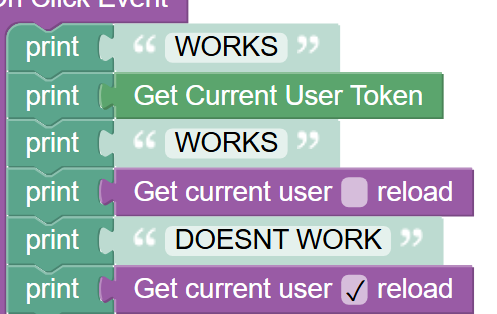
I’ve been having a lot of problems for a while with it updating the user record in the database, but not on the client side, even when the box is checked. However, now it just causes an error anytime I try to reload.
This is under “Current_Draft” container on Admin where it says “login” about halfway down in the on-click event.
Thanks for reporting this. I’ve tested this functionality but haven’t been able to reproduce the session timeout errors you’re experiencing. The user record appears to be updating in the database correctly as well.
A few questions to help narrow this down:
Are you still experiencing the session timeout errors?
Does it happen consistently, or only sometimes?
Have you tried clearing your browser cache?
The issue might be specific to your browser session or cached data. If it’s still happening, could you share a screenshot of the actual session timeout error when it occurs?
Are you still experiencing the session timeout errors?
Yes, but only when the “reload” checkbox is checked on “get current user”. Currently, it is unchecked, as this is a live project.
Does it happen consistently, or only sometimes?
Consistently whenever the “reload” checkbox is checked on “get current user”
Have you tried clearing your browser cache?
Yes. We also get the same error on different computers.
could you share a screenshot of the actual session timeout error when it occurs?
A screenshot of the error message in console is already in the original post. Is that what you were referring to?
The reload parameter checkbox whether Get Current User returns cached user data or fetches fresh data from the server.
When checkbox is unchecked:
Returns the cached current user object immediately if it exists in memory
No network request is made
Fast performance, but data may be stale if the user was updated on the server
When checkbox is checked:
Bypasses the cache and fetches fresh user data from the server
Makes a network request to get the latest user information
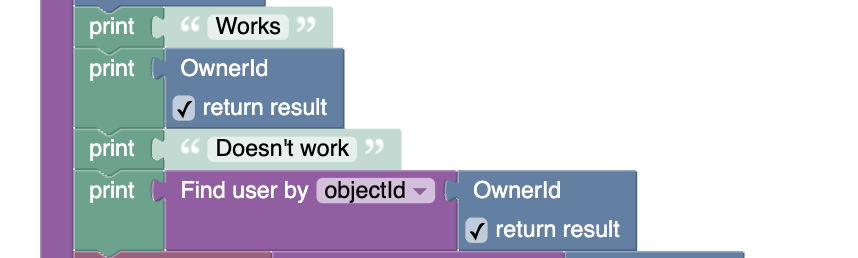
When the reload checkbox is checked, Get Current User internally calls the “Find user by objecId” with the current user’s ID to fetch the data. This means that any errors thrown by Get Current User (checked) will be identical to those thrown by “Find user by objeciId” - they use the same underlying API call.
“Session Expired” - When it happens:
Only with Get Current User(checke) - The error occurs when the method makes a server request via “Find user by objeciId” and the user token stored locally is no longer valid on the server.
Common causes:
Incorrect or missing user tokens in the client.
Manual logging/logout elsewhere - The user logged out from another device/session
Expired session tokens (tokens expire by default after 7 days, but this interval is configurable).
User account changes - The user was disabled, deleted, or their credentials were changed
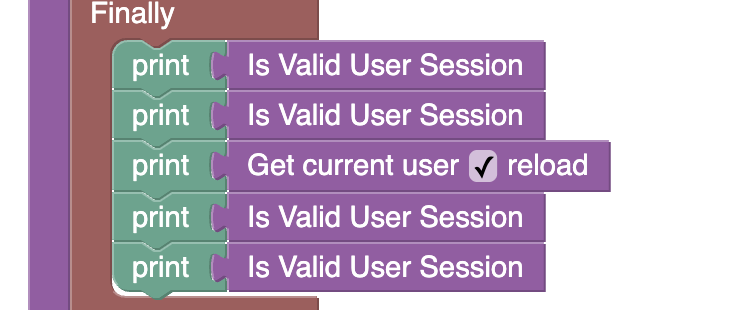
It looks like the user token is outdated. Before calling “Get current user” (especially with reload), make sure the user is still logged in. You can use the “Is Valid User Session” block. If the token is not valid, try logging out (the “logout current user” block).
It confirmed there was a valid user session, but still provided a session error when trying to get the user record. Is there anything else I can try to fix it? I’ve been having problems with user records for a long time and am eager to try to finally resolve it.
As my colleague mentioned above, there are several reasons why a token can become invalid. I suggest reviewing those reasons and making sure none of them is causing this issue.
Also, regarding the latest screenshot you provided, could you please include the console output you’re seeing? If possible, it would also be helpful to see the part of the code that is currently cut off in the screenshot.
And one more question: do you get this error every time this part of the code runs, or only under certain additional conditions?
I figured it out. When the user logs in, I had a condition that would log them out first if they were already logged in. It looks like the logout wasn’t completing before the login, so every time the user logged in, they were immediately logged out.