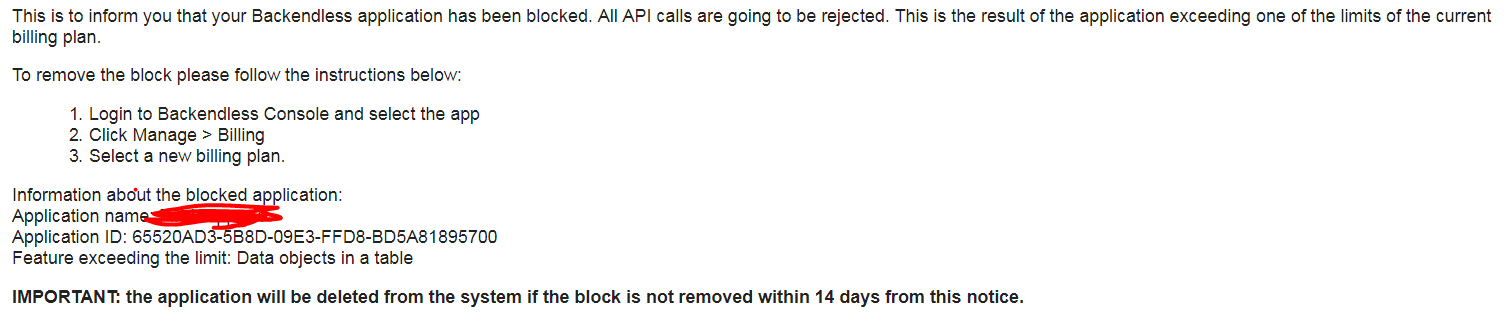
This is the fourth time we report this problem and keeps occurring once and again.
We have returned to levels under the limits of our plans but your systems still don’t check if a value has returned to the expected range so our app has been blocked since 48 hours happened after the first warning and now threatens with deleting the app.
![]() http://support.backendless.com/public/attachments/f85558407f641f7bcb7b31110a847d11.PNG</img>
http://support.backendless.com/public/attachments/f85558407f641f7bcb7b31110a847d11.PNG</img>
Is it really that hard to set a timer to check those limits again? Or to use the same trigger that you use to check that a limit has been exceeded?
How many times do we need to report this error?
Your application is not currently blocked, all API calls are working. The banner in console will go away automatically.
Mark
Hi Mark, what I’ve sent you is not a banner, but an email from info@backendless.com
An email that has been sent after the limit exceed was already solved.
When you returned to the level allowed by the plan, the APIs got unblocked. I connected to your app and didn’t see any issues.
Regards,
Mark
You can keep answering me with that vehement tone.
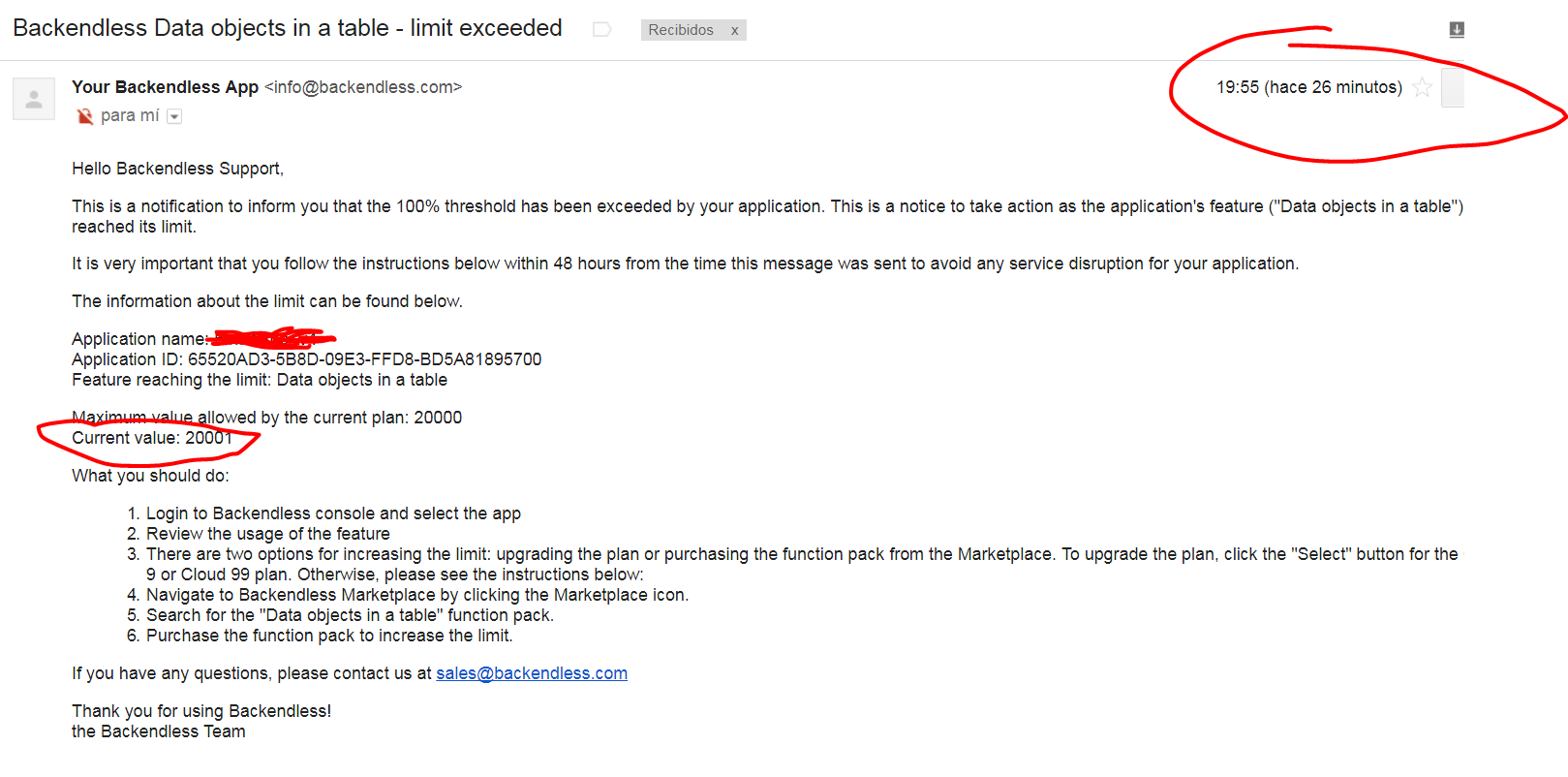
In the meantime since your last answer I have received another email warning me:
![]() http://support.backendless.com/public/attachments/fd42db6dff507b0a0fa3624a7306e741.PNG</img>
http://support.backendless.com/public/attachments/fd42db6dff507b0a0fa3624a7306e741.PNG</img>
When the exceeded table is now 0 items size.
And still your API is throwing me errors:
![]() http://support.backendless.com/public/attachments/e80be3bde768c213b8dc9a3b8e377d68.PNG</img>
http://support.backendless.com/public/attachments/e80be3bde768c213b8dc9a3b8e377d68.PNG</img>
I have warned about these errors in the past…
Don’t know what else to do.
vehement tone?? I think you should really chill…
Let us know if/when the app actually gets blocked. I checked the APIs and they are working fine.
As for the email, we will check why they are misfiring.
Mark
Hi Jose,
Have you removed the table entirely or just some objects? There’s a known issue when removing the table entirely does not reset the cached object count inside the system, this might cause some incorrect notifications.
It is, if I report a problem and you say “I don’t see any issue” and tag the question as “Not a problem” without checking back with the user/customer.
Besides that I have reported this issue twice before this time…
Hi Sergey,
I have clicked inside the table in “More” → “Delete all”. It looks like it deletes all the items because the table and the schema still appear in the console.
The table appears with 0 rows size, so your API should not be throwing this error that I just obtained in my app:
![]() http://support.backendless.com/public/attachments/bb5c8e3dda3c99e85391ecba838aceea.PNG</img>
http://support.backendless.com/public/attachments/bb5c8e3dda3c99e85391ecba838aceea.PNG</img>
So independently that Mark says that the API is working right, it’s not. Probably your “checklist” just tries to make calls that READ data and that works, but I can not write data. I can not create new rows inside the table. So the API really doesn’t work properly.
Actually, I have just tried to create a row from the console and I have not been able to do it. A red pop up warned me about the limit hit with the same message that in the above pic.
Please take a look deeper.
Should be fine now, please verify. We’ll increase the priority of this problem since it affects your app really often. For reference, the task ID is BKNDLSS-16466.
Apologies for the inconvenience.
Thank you Sergey, now works as expected.
I usually try not to hit the limit, and if I do, I fix it and returns to the range expected but if it stops working I can not do anymore 
Thank you for your considerations.
Actually, “Delete all” button has stopped working since your last message down below.
I have tested in two apps without success and in a third (Test app created) where it worked.
So now, in order to clean I have to delete the whole table.
Do you have any permissions in those apps, where Delete All doesn’t work? There are still some cache issues we’re working on urgently, the one confirmed is with data retrieval when there are permissions set up for this operation.
Hi Sergey.
I’m the administrator of all the apps that I mentioned you.
I just tried right now with 37073A34-473D-32A2-FFD4-4D2885816700 and I had to drop (delete) the table because “Delete all” wasn’t working.
What do you observe after clicking “Delete All”? Do the entries disappear and then appear again or just nothing happens at all?
I’m prompted with the warning pop up. I confirm clicking on “Delete” and then the “refresh” animation cycles and the rows are refreshed or reloaded (don’t know).
Basically, it happens the same that if I am in a different table and then click on a new table. BTW “Loading” appears written where the items are displaed after the load finishes.
So visually they dissaper until they are loaded again.
Can I try that in your app on some test table?
You are ready to go. You will find a table with your name in my last mentioned app.
OK, I can see the problem now, we’ll be investigating it.