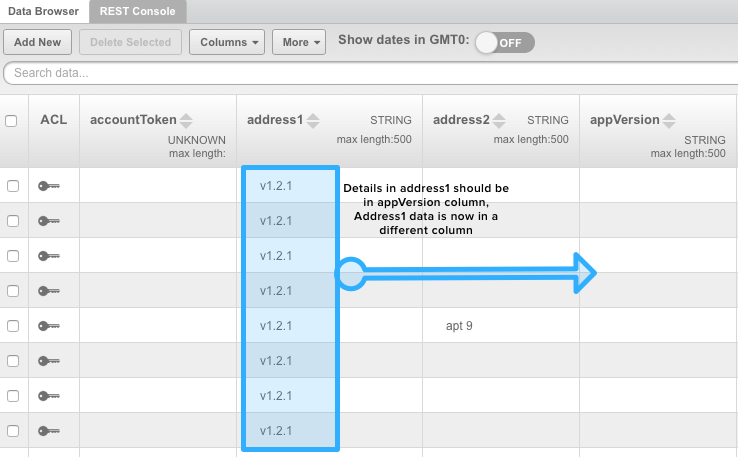
I am in the process of trying to migrate my app from backendless 3 to backendless 4 and have hit a series of issues related to backendless. I have a couple of tickets open but this one is urgent. The import of my data into backednless 4 app was failing so I was trying to clean up some of the data in my production app. I deleted a couple of unused columns and when I did this all the data in the table in question got shifted. So for example I have 3 columns…
Address
App version
User block
I deleted the user block column, and now the data from app version is in the address column, and there is no data in the app version column. All the data in my table is all screwed up making the app completely useless.
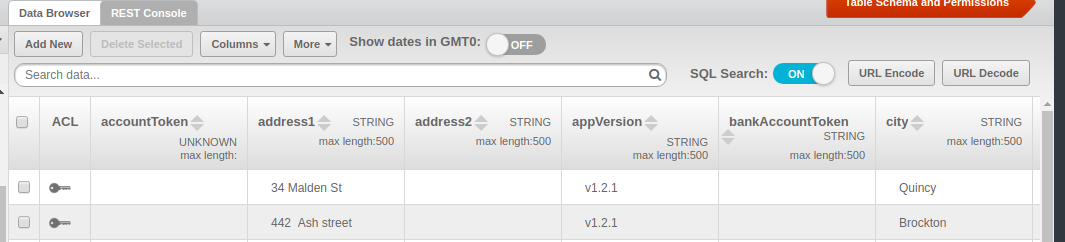
This is just a console view problem. Your data is fine and you can check it by issuing any GET request in the REST console. Try to clean the browser cache and update the page to fix this.
To assure you that everything is OK, here’s how I see the data in your table from my browser:
Just to note, this is a known issue in 3.x, however it won’t probably be fixed due to the fact that it doesn’t affect the data and is easily fixed on the client side, and also because of deprecation of 3.x.In Backendless 4 this issue is not present.