I’m getting this error occasionally for some users.
Error: User is already logged in from another device/computer. The application is configured to disable multiple concurrent logins with the same user credentials.
I had (have since changed it to try and elevate the problem for now) the configuration set to not allow multiple logins, and to logout and notify the first user.
When I test this on my PC and phone, it worked as expected and as described by @mark-piller in the video - https://www.youtube.com/watch?v=CQQBVKsAZ6g. If I’m logged into my PC, then login on my phone, the PC session gets logged out, which is what I expected and want.
In the situation of the error, the first user should get logged out and notified when the second users tried to login. So there should never be a situation where this error is thrown. The situation of multiple logins is automatically handled from what I understand from the settings page and Mark’s video.
The only thing I can think of, is the user is trying to re-login on the same session. I tried to replicate this in my app using two different authentication methods (U/P login + magic link) and it handle that without erroring so I’m stuck.
Thank you for the detailed write-up, it gave us what we needed to track this down, and we were able to reproduce it.
Your configuration and your expectations are both correct. The scenario you tested manually is the one that works: when the same user logs in again, the earlier session is terminated and the new login goes through, exactly as in Mark’s video.
The failing case is a different one. The error appears when a login request is sent while a still-valid session belonging to a different account is attached to the client: user A is logged in on that device, and user B then logs in without a logout in between. In that situation the login is rejected instead of the previous session being terminated.
That’s why it only shows up occasionally and only for some users: it needs two different accounts on the same device or browser — a shared computer, a browser where a previous session was never explicitly closed, or a link opened while another account is still signed in. Your own attempts couldn’t hit it because you were logging in as the same user each time.
As a workaround, calling logout before the login request (or clearing the stored token) removes the condition that triggers the error.
Thanks for spotting the issue and describing it so clearly, I’ll pass it on to our development team.
Thanks for looking into this for me. I didn’t think of two users on the same machine/browser, but that is exactly what is happening with this user. They have two accounts to our portal, a work and personal and they’re probably switching between.
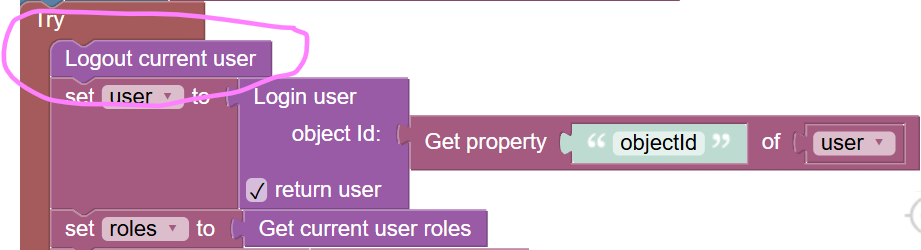
I added the logout current user block to the code that is throwing this error. Is this what you were suggesting?
Yes, @Tim_Jones, that’s exactly it — and the placement is right: immediately before the login call, so nothing from the previous session is still attached when the login goes out.
The logout block behaves the same way whether you call it from UI Builder or from Cloud Code - there’s no difference between the two.
In both cases it terminates the login session on the server. The session is tied to the user’s login token, so if that same token was used to log in from both UI Builder and Cloud Code, logging out will end all sessions associated with that token - not just one.
On the client side, it also clears the browser’s (or device’s) local storage, where the login state is kept - the user token, the user object id, and the “stay logged in” flag. So after the block runs, both the server-side session and the locally stored credentials are gone.
No, the Logout current user block logs out only the session whose user-token came with the request, it does not touch the other sessions of the same user; and if no user-token came with the request at all, it does nothing and still returns success.
So to me it looks like the logic above will work well only if a request with a user-token is guaranteed to reach it.
Otherwise, multiple logins being enabled simply lets the user log in the configured number of times, and on the next one you get the error you are seeing. The occupied slots do not free themselves: a session lives until the configured session timeout expires, and every request made with that token starts the countdown over.