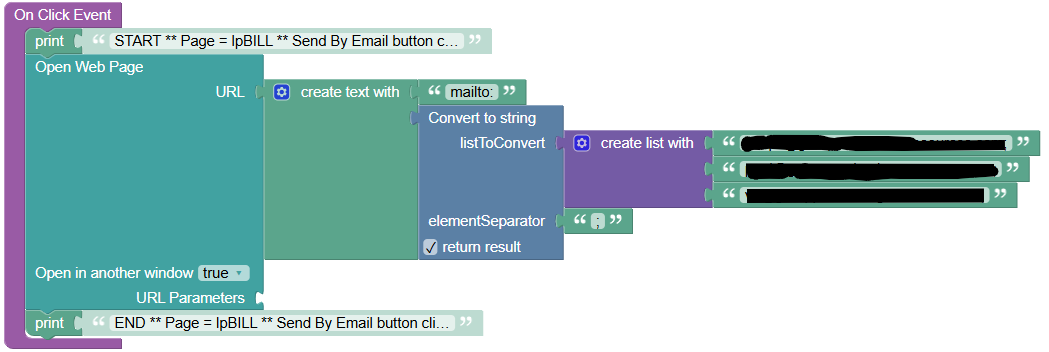
This section of code has been working until one of our users reported this to us as a bug. The code completes but the mail client refuses to start. This code is engaged using a button.
Hi @Richard_Munger ,
What is your application ID?
Just to clarify: this logic worked previously but has now stopped working, without any changes on your side, correct?
If so, please open “DevTools” > “Console” in your browser, then reload the page and click the button that triggers the logic. Do you see any errors in the Console section?
Regards, Andriy
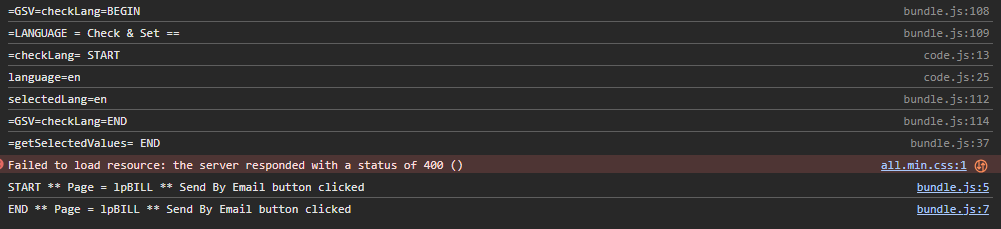
Thanks for the console output. I can see the START and END logs from the On Click Event handler, which tells us the logic itself runs through without throwing — so the problem is in the URL that gets handed to the browser, not in the flow reaching that point.
Looking at your logic, I think the issue is the element separator in the “Convert to string” block. If those list elements are email addresses and they’re being joined with a semicolon, that would explain the behaviour exactly.
The mailto scheme requires multiple recipients to be separated by a comma, not a semicolon (RFC 6068). The semicolon convention comes from Outlook’s compose window, but it isn’t valid inside a mailto URL itself. Some mail clients tolerate it; others fail to parse the address list and silently reject the whole link. Nothing is thrown, nothing appears in the console, and the click simply does nothing — which matches what you and your user are seeing.
Could you change the elementSeparator from “;” to “,” and republish, then test again?
Regards, Andriy
Changing from semicolon to comma did not change the end-result. However, changing the multiple destination email addresses and replacing with a single email address works. Any suggestions on handling the multiple email address issue?
Since the addresses were entered manually, the URL we’re generating is almost certainly fine — which suggests your mail client is rejecting the link when it contains more than one recipient.
The quickest way forward is to find a format your mail client accepts before we change anything in the app. Could you paste each of these into your browser address bar and press Enter, and let me know which ones open a compose window with both recipients filled in:
mailto:a@example.com,b@example.com
mailto:a@example.com;b@example.com
mailto:a@example.com%2Cb@example.com
mailto:a@example.com?to=b@example.com
That takes the app out of the picture entirely. Once we know which format works, it’s a small change to produce that shape in your logic — the third is just a different elementSeparator, and the fourth means putting the first recipient in the address and the rest as parameters.
If none of them work, the issue is in how your mail client handles multiple recipients from a mailto link, and nothing we do in the app will fix it.
Worth saying plainly either way: mailto depends on whatever mail software each user has installed, multi-recipient behavior varies between clients, and failures are silent — the app can’t detect them. So a format that works on your machine may still fail for someone else. If this button matters, sending the email server-side from Backendless would remove that dependency entirely and handle any number of recipients reliably.
Regards, Andriy
Hello, @Richard_Munger
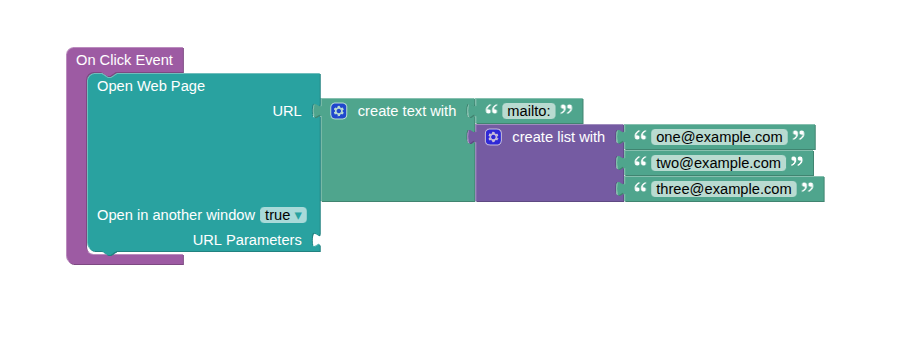
If a comma works fine as your separator (and for mailto: links, it actually should — that’s the standard), you don’t need any custom code at all. You can just skip the “Convert to string” step completely and plug your list straight into “create text with,” like this:
If you do need a different separator for some reason, then a small custom method is the way to go. Here’s ours, in case it helps:

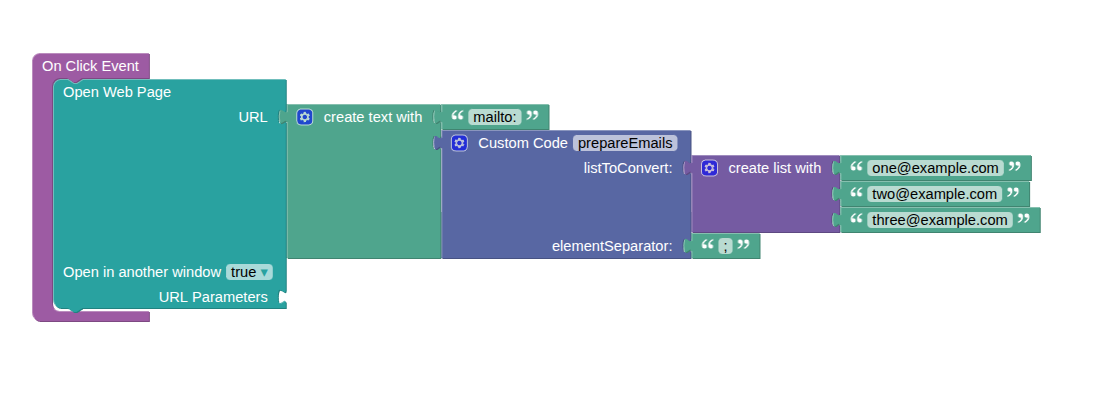
You’d hook it up with listToConvert as your address list and elementSeparator as whatever character you want to use instead of a comma.
One more thing — I still can’t track down your “Convert to string” block in the standard UI Builder palette, so it looks like it’s a custom function built specifically for your app. Would you mind opening it up and sharing what’s inside?
Kind regards,
Karyna
worth checking your email password is still inplace. It has a way of dropping off